OLIFY mobile app
The OLIFY maintenance and facility management application also includes a mobile app that provides quick access to all the information you need about assets, inspections, and work requests. It makes it easy to submit work requests, supports technicians in the field, offers QR code scanning, and more.
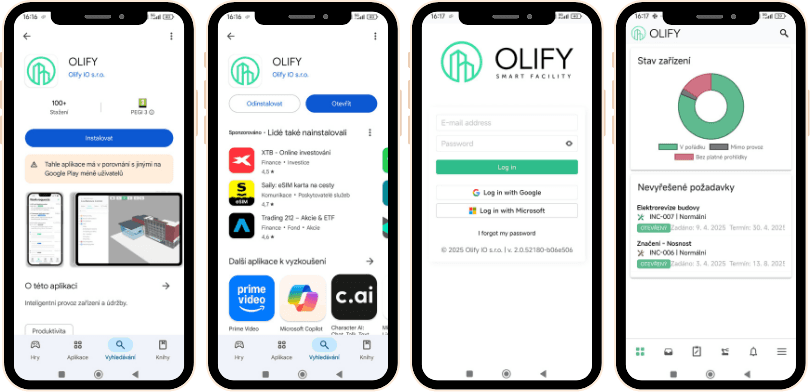
Installing OLIFY on Android (Google Play):
- Open Google Play on your mobile device.
- Enter "OLIFY" in the search field.
- Select the OLIFY app (Olify IO s.r.o.) from the results.
- Tap "Install".
- After installation completes, tap "Open", or open the app from your mobile device's home screen.
- Sign in according to your application settings (password or Microsoft sign-in).


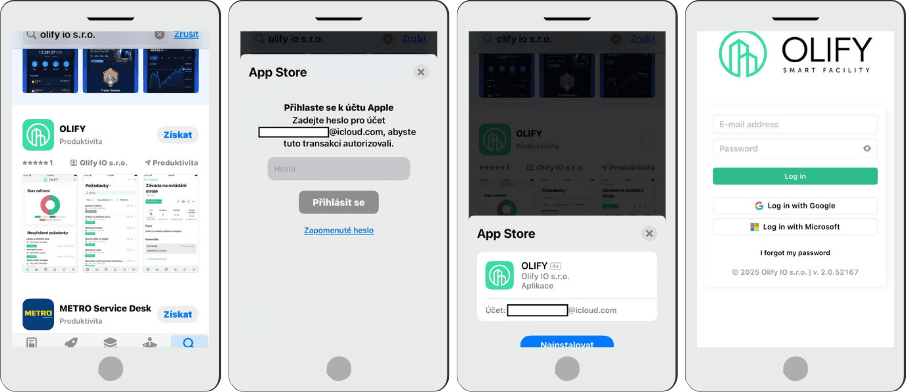
Installing OLIFY on iOS (Apple App Store):
- Open the App Store on your device.
- Enter "OLIFY" in the search field.
- Select the OLIFY app (Olify IO s.r.o.).
- Tap "Get" and sign in to your iCloud account (for example, Face ID, Touch ID, or password).
- Tap "Install" and open the OLIFY app, where you can sign in with a password or Microsoft sign-in.